

 Es
Es  Fr
Fr  Pt
Pt  En
En 

-
-
-
-
-
-
-
-
-
-
-
AutoPoint Clouds Registration
-
-
-
-
-
-
-
-
-
-
-
-
AutoPoint Clouds Registration
 Ribbon: Point Clouds > Point Cloud >
  Auto point clouds registration
Menu: Point Clouds > Registration >  Auto point clouds registration
Toolbar: Point Clouds 3DScan > 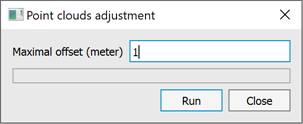
 Command line: PC_REGISTRATION_AUTO
This command allows for automatic registration (stitching) of point clouds without the use of reference points.
For automatic registration, select two point clouds to be aligned, then specify the one relative to which the registration will be performed. If the automatic mode is selected, the user’s actions end there; the neural network will automatically determine the preferred algorithm based on the images, and other parameters will also be calculated. An important condition is that the point clouds should have calculated normals; without this, the automatic mode does not work.
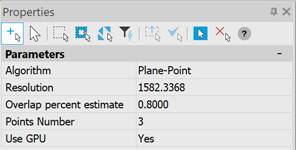
The command parameters are set in the Properties bar.
|
Algorithm |
Selects the registration algorithm. |
|
Resolution |
Indicates how often (with what step) points are selected on the cloud for registration. |
|
Overlap percent estimate |
Shows what portion of the clouds is expected to already overlap before registration. |
|
Points Number |
The number of points in each iteration of the registration algorithm to find the next approximation. |
|
Use GPU |
Use of hardware capabilities supporting DirectX 11, if available. It is not recommended to disable this option. |